

Product Overview
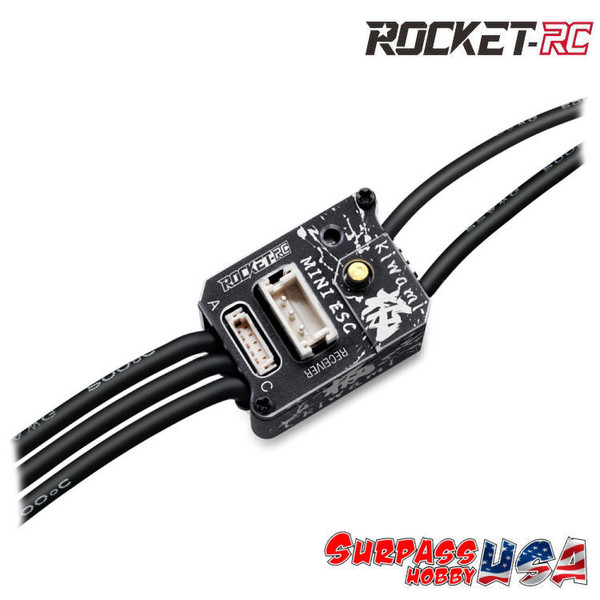
Rocket-RC (Kiwami) PRO V2 Mini28 30A Sensored ESC w/ Program Card (Black)
Excellent Option Part for Kyosho Mini-Z, Atomic, Team Associated, Xbility, G-Force, Reflex Racing, and many More...
Race and Drift Modes Available!
Surpass Hobby has released their latest electronic speed controller, the New Rocket-RC Kiwami MINI 28 PRO Sensored Brushless ESC for 1:28/1:27 Mini Drift and Touring Car Racing. Featuring a CNC aluminum housing that is the perfect combination of shape and function giving it a super small size making it extremely light weight. It has a powerful output support with a continuous current of up to 30A and burst of 80A The ESC has a wide range of parameter settings to precisely adjust power requirements for the ultimate control experience. PWM drive frequency, Brake frequency, Boost, Turbo and two driving modes: Zero timing(Blinky) & Modified mode, all which can be adjusted with the included the New V2 LED Program Card. Built for sport and competition use.
Specifications:
- Color: Black
- Voltage Input: 2S LiPo 6.0v-8.4v
- Continuous Current: 30A
- Burst Current: 80A
- BEC Output: 3A 6V/7.4V
- Motor Type: Sensored Brushless Motors for Mini RC 1/27 & 1/28 Cars
- Weight: 7.6g (with wires)
- Waterproof: NO!
- Dimension(LxWxH): 21Lx13.8Wx11H mm
- Motor is Direct Solder
- Includes receiver and sensor cable
- Includes: All new 2x2 LED Program Card
- FIY the default mode is set to Drift
"IF YOU ARE HAVING A PROGRAM CARD ISSUE, FOLLOW THESE STEPS"
Rocket-RC Kiwami PRO V2
If your program card is stuck in an infinite loop, counting from 1 to 20 repeatedly, it indicates a connection failure where the card is attempting to initialize but cannot communicate with the ESC.
The "Infinite Loop" Fixes (2025)
• Force the Connection: The most common cause for this specific looping behavior is that the plug on top of the program card is not fully seated. You must push the lead in with firm pressure until it "clicks" or is visibly flush with the card.
• Reverse Power Sequence: The card often fails if the ESC is already on when you plug it in. Follow this exact sequence to break the loop:
1. Disconnect the battery from the ESC completely.
2. Plug the program card into the ESC.
3. Then connect the battery and turn the ESC power switch to ON.
• Disconnect the Receiver: If the ESC is still plugged into your FlySky receiver, it may be receiving a signal that prevents the program card from locking on. Unplug the ESC from the receiver before connecting the program card.
• Check Plug Orientation: While an upside-down plug usually shows "ERR," in some firmware versions, it can cause an infinite cycle. Ensure the black (negative) wire is matched to the negative (-) marking on the card.
• Battery Voltage: Ensure your battery is fully charged. Low voltage (e.g., using a partially discharged storage pack) can cause the card's processor to reboot repeatedly, appearing as an infinite count.
Expected Behavior
• When working correctly, the card should count from 1 to 20 exactly once and then stop at "Item 1". Once it stops, you can use the ITEM button to navigate and the VALUE button to make changes.